
Data Integrity score (DQI)
The Data Integrity score tells you how far you can trust a PV system's data before you report numbers from it. It is shown as a percentage. This page is for asset managers and energy analysts who publish KPIs such as Performance Ratio to owners, investors or lenders. A frozen sensor or missing intervals can quietly distort a number that otherwise looks good.
What's new
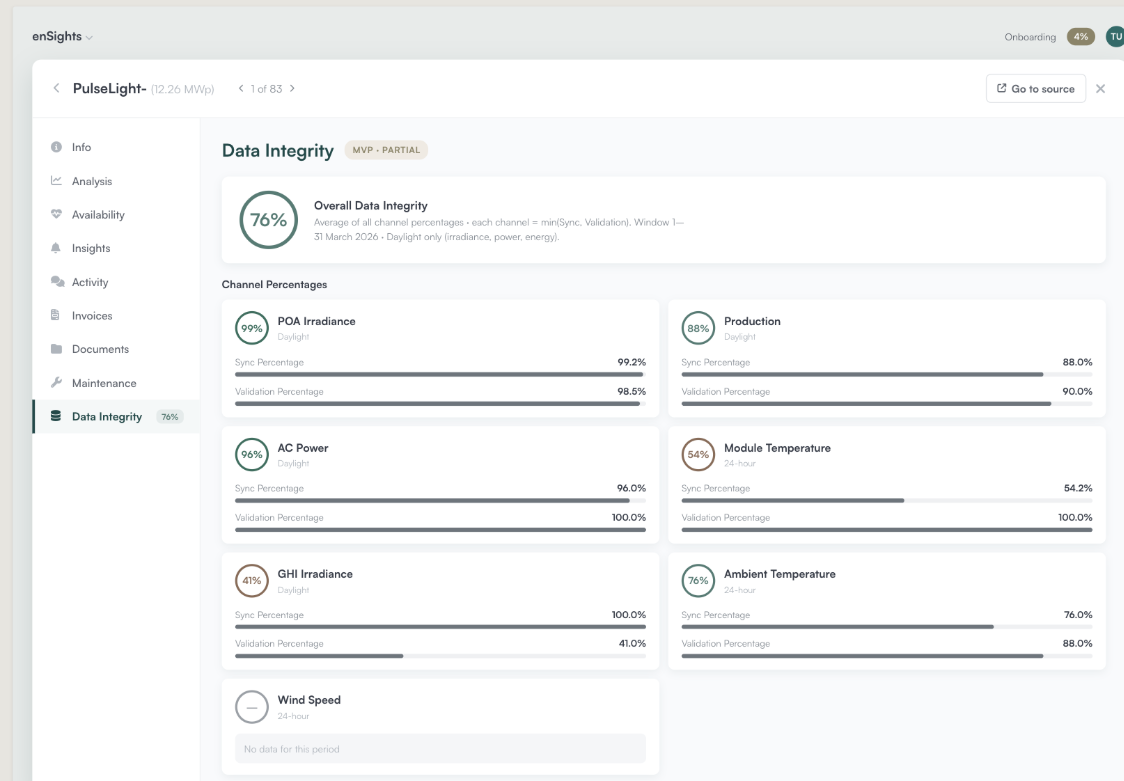
- One score per system. The system's Data Integrity tab shows a single System Score as a percentage (0–100%).
- Always in view. The same percentage appears as a badge next to Data Integrity in the system's left-hand menu, on every tab. You can see the score without opening the tab.
- Drill down to the weak channel. Open the score to see Sync and Validation for each channel.
What the score measures
Each data channel, such as an irradiance sensor or an inverter's power, is checked on two things:
Measure | What it means |
|---|---|
Sync (%) | The share of expected records that actually arrived. Missing intervals lower it. |
Validation (%) | The share of the records that arrived that are valid, meaning they fall within physical bounds. Impossible values lower it. |
These two measures roll up into the scores you see:
- A channel's score is the lower of its Sync and Validation. The weaker measure decides. If all of a channel's data arrived (100% Sync) but none of it is valid (0% Validation), the channel scores 0%, not 50%. Data that arrives but can't be trusted is no better than data that never came.
- The System Score is the average of all channel scores. One bad channel pulls the system down but doesn't drive it to zero. That is why you should drill down whenever the score is below what you expect.
How to
Check a system before sending a report
- Open the system and look at the badge next to Data Integrity in the left-hand menu.
- If the score is lower than you'd expect, open the Data Integrity tab and drill into the System Score.
- Find the channel with the lowest score. Decide whether the KPI you are reporting depends on it. For example, Performance Ratio depends on the irradiance channel.
Tell a missing-data problem from a bad-sensor problem
- Drill into the System Score and find the weak channel.
- Low Sync means records are not arriving. Look at communication and the connector.
- High Sync with low Validation means records are arriving but their values are impossible. Look at the sensor itself, its calibration or its configuration.
Notes
- The score is partial by design. Right now it is based on Sync and Validation only. A value that is stuck at a plausible number, such as a frozen sensor reading, can still pass both checks. Treat a high score as necessary for trusting a number, not as proof that the number is right.
- No data is not 0%. A system with no data, or not enough data to score, shows a neutral state instead of a percentage. A neutral state means "can't tell", not "fully broken" or "fully trustworthy".
- The score is per system. It appears only inside the system: in the Data Integrity tab and in the menu badge. It isn't a column in the PV Systems table, and it isn't shown next to individual KPIs.
- The Data Integrity score is being switched on account by account. If you don't see the badge, contact your enSights representative.