
Fleet Management: EMS Sites
Monitoring & Control → Fleet Management → EMS Sites
What this page is for
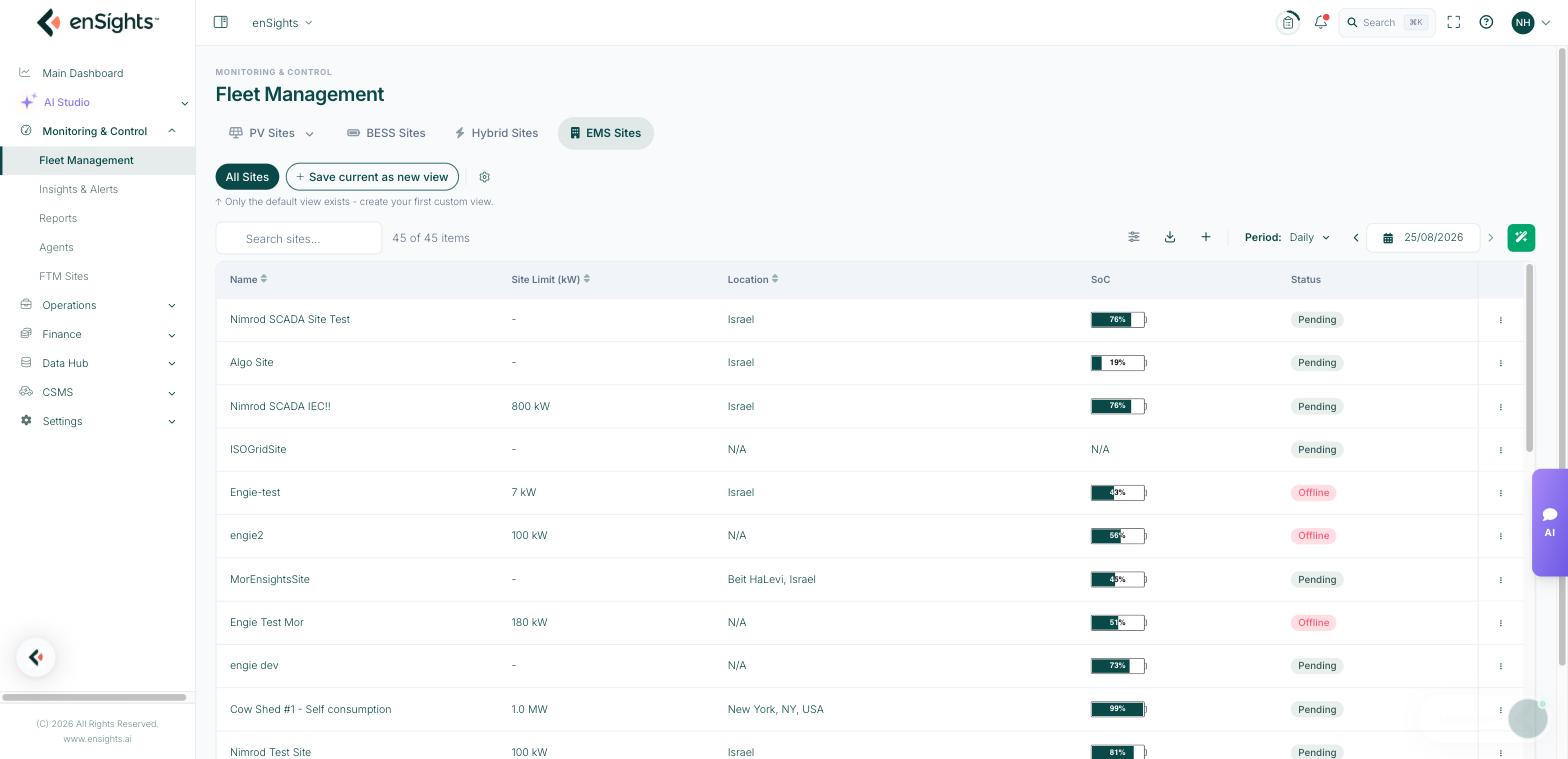
EMS Sites lists the sites where enSights does not only watch the equipment but controls it — batteries charging and discharging to a schedule, inverters curtailed to a limit, export held under a site cap. If a site appears here, an energy-management policy can be pushed to it.
This is the operational counterpart to PV Sites and BESS Sites: those tell you what happened, this one decides what happens next.
The table
- Name — the EMS site. Click it to open the site's control pages.
- Site Limit (kW) — the connection or export limit the EMS must respect. A dash means no limit is configured, so limit-based policies have nothing to work against.
- Location — city and country.
- SoC — combined state of charge of the site's storage.
- Status — the commissioning state of the EMS link. Pending means the site is defined but not yet exchanging control messages with its controller.
Search, Preferences (columns), Export, the period control and the view chips all behave as described in Saved views, filters and columns. EMS Sites is also where the "modified view" bar is most visible, because resizing columns on this narrow table counts as a change.
Row actions
- Edit — the site's identity and limits.
- Open Wizard — the guided setup that walks through equipment, meters and controller for a new site. Use this for commissioning rather than editing fields one by one.
- Configuration — the low-level configuration pushed to the controller.
- One-time Policy… — a single scheduled action (charge, discharge or limit) for a specific window, without touching the recurring policies. This is the right tool for a one-off event such as a grid test or a heat-wave peak.
- Design — the site's single-line/equipment layout.
- Share… — give someone outside the tenant a link to the site's view.
- Copy to Tenant… — duplicate the site definition into another tenant.
- Delete — treat as permanent.
Inside a site
Clicking a site opens the EMS workspace with its own tabs: Live, Dashboard, Policies, Insights, Maintenance, Meters, Controller, Documents and Diagnostics. They are covered in EMS site: Dashboard, EMS site: Policies and EMS site: Meters, Controller and Diagnostics.
Common tasks
Commission a new EMS site. Add the site, then run Open Wizard and complete equipment, meters and controller. The Status column moves off Pending once the controller is talking.
Handle a one-off grid event. Row actions → One-time Policy…, set the window and the operation. Recurring policies resume automatically afterwards.
Check a site is actually under control. Open the site → Dashboard and look at Active Policy in the Live Data rail. "N/A" means nothing is being enforced right now.
Common questions
The site shows Pending and never changes.
Pending means no controller handshake. Open the site's Controller tab — if it says no agent is assigned, the site needs an agent (see Agents).
What is the difference between BESS Sites and EMS Sites?
BESS Sites is the monitoring view of the batteries themselves. EMS Sites is the control layer over a whole site, which may include batteries, inverters and meters together.
Why is Site Limit empty?
It has not been configured. Until it is, policies that cap export or import have no reference value.