
System Settings: Alerts Management
Fleet Management → a system's ⋮ menu → Edit → Alerts Management
How alerting works
Every insight you see on the Insights & Alerts page came from a rule on this tab. A rule pairs a condition with a threshold, a severity, a delay and a list of recipients. Tuning alerts is almost always about the delay and the threshold, not about switching rules off.
The tab has three sub-tabs: General, Performance and Indicators.
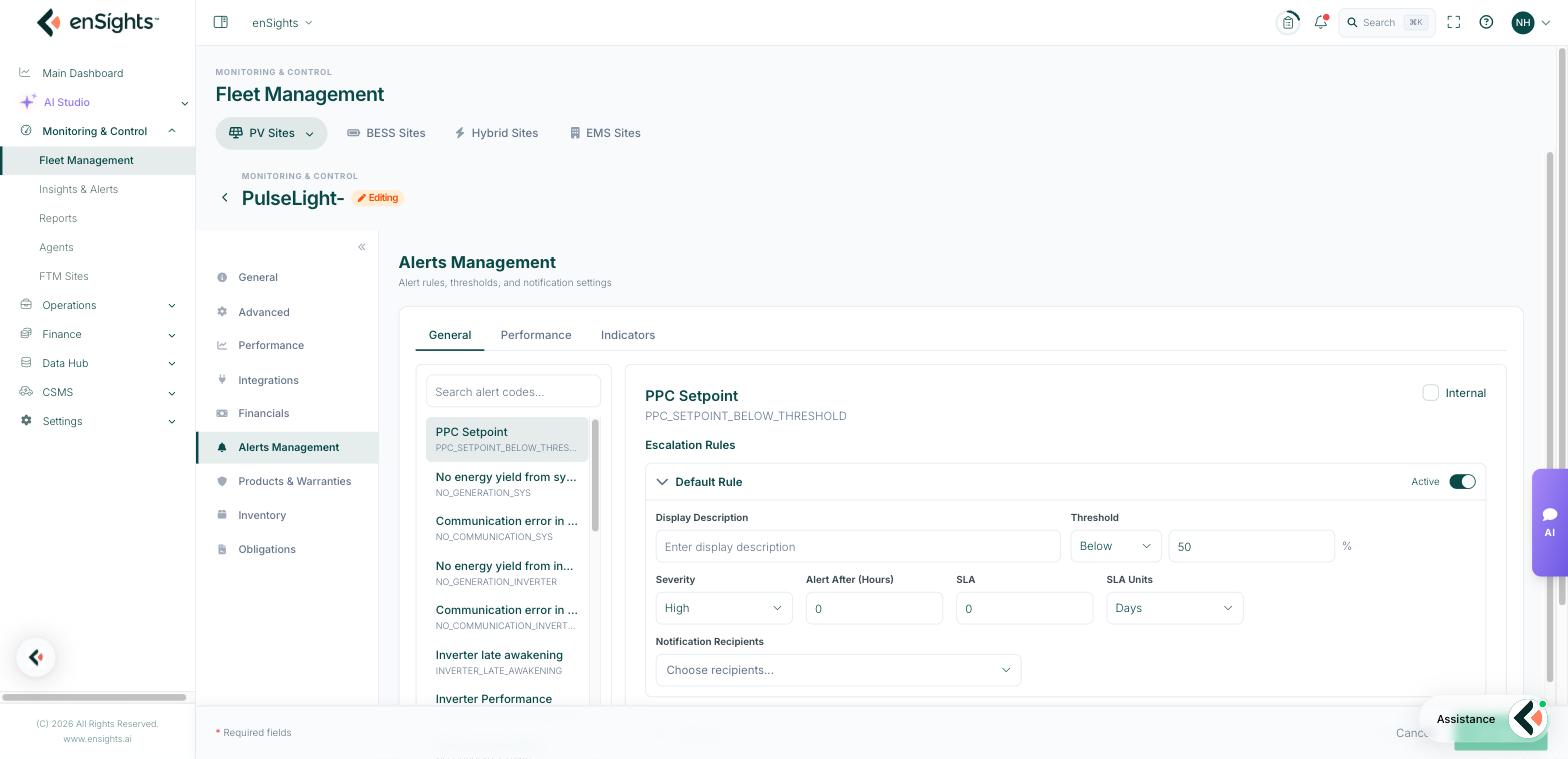
The fields on a rule
- Internal — keep the alert inside your team. Internal alerts do not reach customer-facing recipients and are hidden from the insights list unless Show Internal Alerts is on in its filter.
- Display Description — the wording that appears on the insight. Worth customising for rules your customers see.
- Threshold — the value, with Above or Below and its unit (usually %).
- Severity — High, Medium or Low. This becomes the Priority column and drives who gets woken up.
- Alert After (Hours) — how long the condition must hold before the alert opens. The single most useful field for reducing noise.
- SLA and SLA Units — the response commitment for this alert. The insights list can then filter on Exceeded from SLA.
- Notification Recipients — who is notified.
- Add Rule — add another rule for the same condition, for example a Medium alert at −5% and a High alert at −15%.
General — availability and equipment faults
These rules answer "is the equipment alive and healthy". They cover:
- System level — no energy yield from system, communication error in system.
- Inverters — no yield, communication error, late awakening, low performance, high temperature, DC voltage too high.
- Strings — no current, no voltage, no data.
- Electrical faults — isolation fault (the array is not properly isolated from ground), phase unbalance, grid voltage too high or low, AC frequency too high or low, power factor below threshold.
- Meters — no generation, no communication.
- Sensors and trackers — sensor not communicating, tracker unit not communicating.
- Site equipment — cleaning robot errors (wash error, power error, water amount), EV charger faults and failed transactions, PPC setpoint below threshold.
- Vendor pass-through — alerts raised by the manufacturer's own platform, such as SolarEdge alerts.
- Process — missing draft invoice, indicator operational status.
Availability rules rarely need thresholds — they need sensible delays. A communication rule with a one-hour delay is normal; fifteen minutes will fire on every network blip.
Performance — output below expectation
These rules compare the site against a reference and fire when it falls short. Two families:
- Relative rules compare the site against its peers or its own history: relative PR, relative APR, relative PR-temperature, relative availability, and tracker angle deviation.
- Absolute rules compare against a fixed threshold and can fire in both directions: PR, adjusted PR (APR), PR-temperature and availability each have an above and a below variant.
The above variants are not a mistake — a PR that is impossibly high is usually a data or configuration fault worth catching.
Performance rules depend on the site's plan: without the P-50 monthly plan in the Performance tab, there is no expectation to deviate from.
Indicators
Alerts on custom data points the site reports, listed as Source Name, Display Name and Type (Alert On). This is how a site-specific signal — a door contact, a pump status, a bespoke SCADA register — becomes a monitored condition. If the table says "No indicators configured", none have been mapped for this site.
Common tasks
Reduce alert noise without going blind. Raise Alert After (Hours) on the communication rules and keep the thresholds. You still learn about real outages, just not about every blip.
Escalate only the serious cases. Add two rules for the same condition: Low severity at a small deviation with no external recipients, High severity at a large deviation with the on-call list.
Give an off-taker their own wording. Set Display Description on the rules they see and leave the technical rules Internal.
Hold a site quiet during works. Use Suspend Alerts on the Advanced tab rather than editing every rule.
Common questions
Do these settings apply to every site?
No — Alerts Management is per system. Configure a representative site, then replicate the pattern; for fleet-wide conventions talk to your enSights contact about templates.
An alert never fires even though the condition is obviously true.
Check the alerting window on the Advanced tab (Start/Stop Alerting At) and the validation window. A condition that only occurs outside the window will not alert.
Who receives notifications if I leave recipients empty?
The alert still opens as an insight in the portal; nobody is notified outside it.