
Knowledge Base
What's New
Go back to enSights.ai
Knowledge Base
What's New
Go back to enSights.ai
General
πŸ‘‹ Welcome to the enSights Knowledge BaseHow to use the knowledge baseSecurity & Compliance Documentation Pack
Monitoring & Control
Inverter low-performance detectionMain DashboardSystem Settings: General, Advanced and PerformanceSystem Settings: Alerts ManagementReports: organising reports in foldersSystem Settings: Integrations, Financials, Products and WarrantiesReports: BESS Periodic ReportAdding, importing and merging systemsAPI connection alerts: Server Error and Wrong API CredentialsInsights & AlertsReports: templates and archiveReports: building and scheduling a reportControllers FTM Sites
Fleet Managment
Expected Weather Adjusted PowerFleet Management: PV SitesSaved views, filters and columnsFleet Management: BESS SitesFleet Management: EMS SitesPV Systems table: summary bar, compare and full screenFrom an alert or insight to the right graph
PV sites
PV Systems Map and Hybrid SitesPV site: the Info tabPV site: the Analysis tabLive Health: what each PV system status meansPV site: Insights, Maintenance, Documents and RemindersPV site: Invoices and P&L Tracker
BESS (storage)
Battery (BESS) site detail
EMS
EMS site: Power FlowEMS site: OverviewEMS site: PoliciesEMS site: Meters, Controller and Diagnostics
Operations
Operations: overview
CMMS
CMMS: Service CallsCMMS: CleaningsCMMS: CalendarCMMS: Service Providers
Customers
Customer Management
inventory
Inventory
forms
Forms: templates and the form designerForms: Results
reminders
Reminders
Finance
Finance: overviewFinance: Business PerformanceFinance: P&L TrackerFinance: InvoicesFinance: BillingFinance: ContractsFinance: Storage Calculator US
Data Hub
Data Hub: overviewData Hub: Data OnboardingData Integrity score (DQI)
API
Data Hub: APIs
MCP
Data Hub: MCPHow to Use enSights MCP server connector
Connectors
Data Hub: ConnectorsProposed Email to Also Energy SupportProposed Email to APsystems SupportProposed Email to Fimer SupportProposed email to Fusion Solar SupportProposed email to Goodwe SupportPV Vendor Integration GuideSummary TableMeteocontrol (VCOM)UnityAlso EnergyAPsystem / YottaCPSEgauge MeterEnphaseFimerFroniusFusion Solar (Huawei)GoodweGPM (GreenPowerMonitoring)HoymilesGrowattSMA (Ennex & Sunny Portal)Solar-LogSolaredge v1SolisSolarmanSungrowSolectriaTesla PowerhubSolaredge v2Goodwe (new API)Connect Slack to enSights
Settings
Settings: overviewGlobal Settings: GeneralGlobal Settings: SecurityGlobal Settings: TagsGlobal Settings: MaintenanceGlobal Settings: PerformanceGlobal Settings: EV ChargingGlobal Settings: Alerts ManagementGlobal Settings: BillingGlobal Settings: EOS AppGlobal Settings: Asset ManagementWebhooksGroupsActivity: Processes and AuditsTeam ManagementRoles & PermissionsTenantsSingle sign-on (SSO) with SAML 2.0
AI Studio
AI Studio: overviewAI Studio: ChatAI Studio: Feedback ReviewAI Studio: Create (coming soon)
Calculations
Availability: PV systemsAvailability: BESSAvailability events: PV systemsPerformance Ratio: PR and PR Temp
Contracts
Set up a system from a PVsyst reportImport contract terms from a PPA

Tesla Powerhub

As a Powerhub owner, follow this url to generate Client Id and Client Secret:
https://energylibrary.tesla.com/docs/Public/More/Powerhub/Residential/UserManual/en-us/GUID-077056DA-C695-4356-B265-87C5FA6E3CB2.html

Populate the generated Client Id and Client Secretin Tesla datapoint
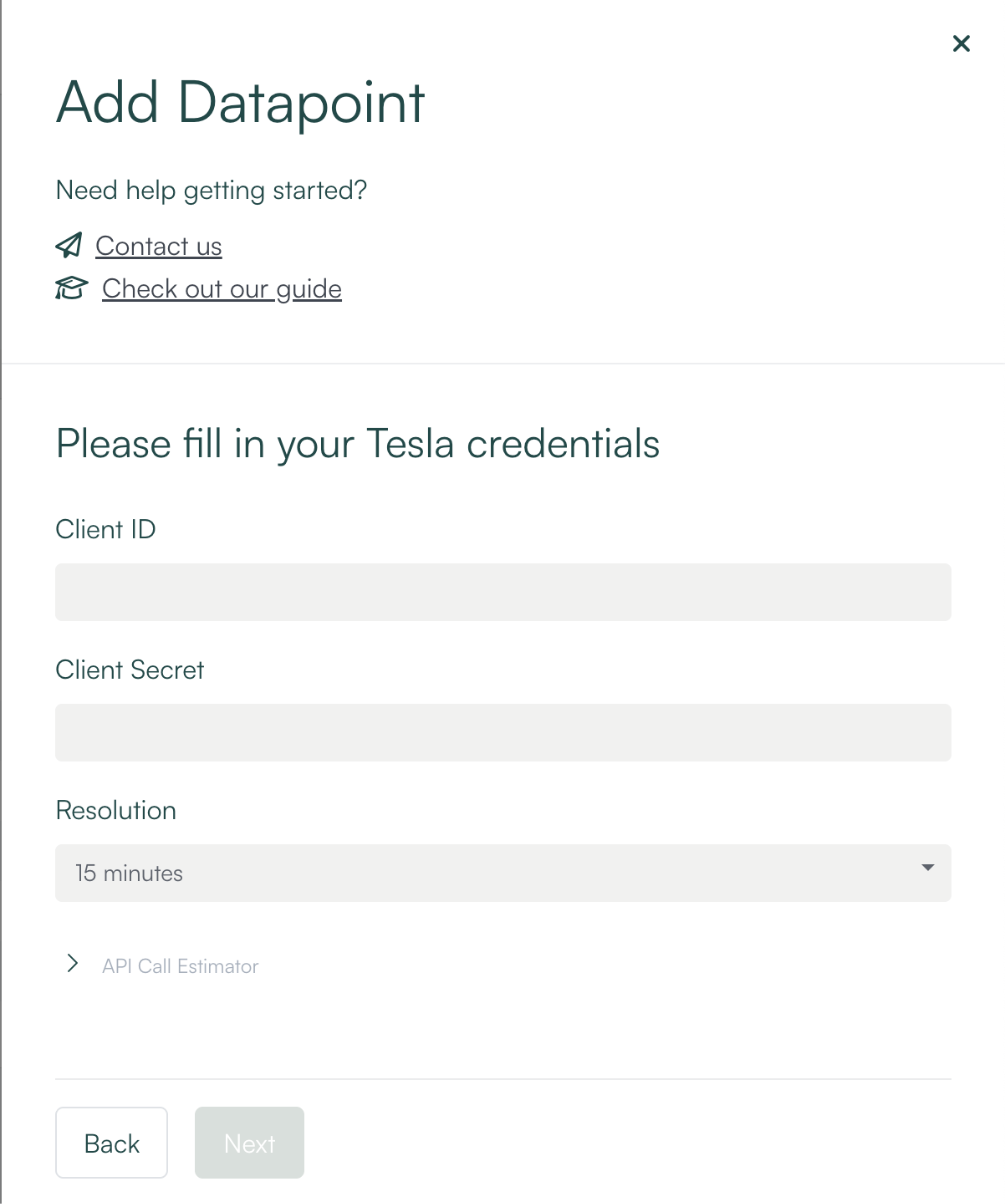
enSights Add Datapoint form: Tesla credentials with Client ID, Client Secret and Resolution fields

Was this article helpful?

Powered by Product Fruits