
Solaredge v2
SolarEdge is retiring its original monitoring API (v1) and moving every customer to a new API platform (v2). On November 1st, SolarEdge disables the v1 API. Any SolarEdge system still connected through v1 stops sending data to enSights on that date.
This article shows you how to create a v2 API key, send it to enSights, and pick the right SolarEdge API plan for your fleet. If you're still on the old per-site key, see Solaredge (v1) for reference only.
What's different in v2
v1 (retiring) | v2 (new) |
|---|---|
One API key per site, found under the site's Admin → Site Access page | One account-level key that covers every site visible in your SolarEdge monitoring account |
Free, no plan needed | Billed by SolarEdge in API credits : 1 credit per API call, pooled against a monthly quota |
Key never expires | Key has an expiry date you choose (up to 2 years) |
The API plan is a SolarEdge charge, paid to SolarEdge directly. It is not an enSights fee.
What you need to send enSights
- Your new v2 API key (created with My Fleet Access, see below)
That's it. Once we have the key, we reconnect your SolarEdge systems on our side. Start early: SolarEdge's account setup and key generation can take a few business days.
How to create a v2 API key
You don't need to buy a plan before you create the key. Create the key first, send it to us, then choose a plan (next section).
- Log in to the SolarEdge developer platform at developer.solaredge.com with your regular SolarEdge monitoring credentials.
- Go to the Applications page and click Create Application.
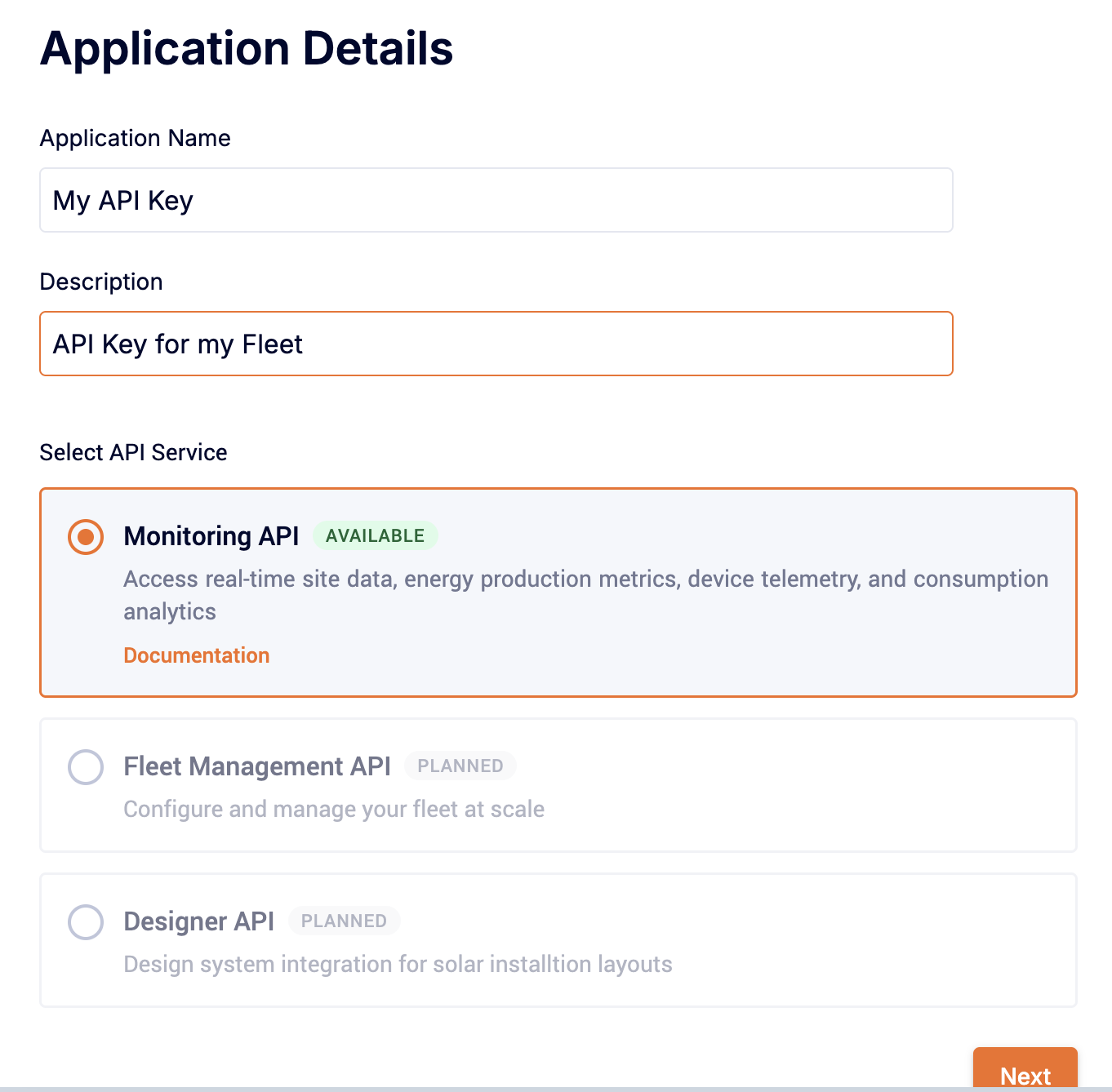
- Enter an Application Name and Description, select Monitoring API, and click Next.
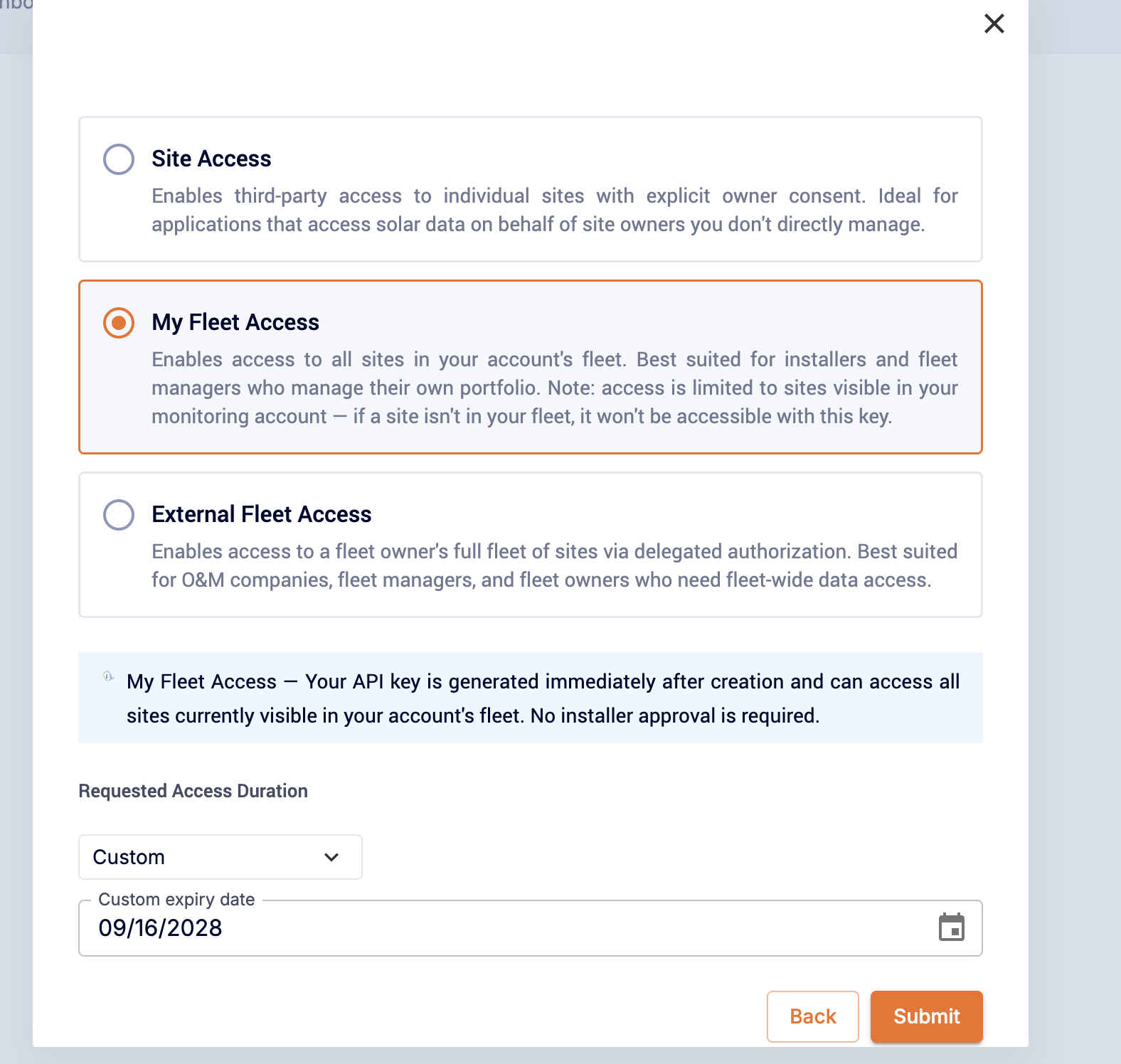
- Choose My Fleet Access. Under Requested Access Duration, set the expiry date. The maximum is 2 years. Click Submit.
- SolarEdge shows your API key. Copy it now and store it somewhere safe. SolarEdge shows the key only once.
- Send the key to enSights support. We'll confirm when your systems are reconnected.
Which access type should I pick?
Access type | When to use it |
|---|---|
My Fleet Access | The right choice for almost everyone. Covers all sites visible in your SolarEdge monitoring account. The key is issued immediately, no installer approval needed. |
Site Access | Single sites owned by someone else, with the owner's explicit consent. Not recommended for connecting to enSights. |
External Fleet Access | O&M companies that need delegated access to another owner's full fleet. Talk to enSights support before choosing this. |
Notice: A My Fleet Access key only sees sites that are visible in your monitoring account. If a site isn't in your fleet, enSights can't reach it with this key. Ask the installer to add you to the site first.
How many API credits will I need?
SolarEdge v2 charges 1 credit per API call. Your usage depends on three things: how many systems you have, which devices you monitor (inverters, meters, weather sensors), and how often enSights polls for data.
SolarEdge API plans
Plan | Credits per month |
|---|---|
Free | 2,000 |
Business Starter | 20,000 |
Business Growth | 100,000 |
Business Pro | 400,000 |
Enterprise | Custom |
Check the plan limits against your monthly usage, not the daily figure. The monthly quota is pooled across your whole developer account. SolarEdge also enforces a separate per-minute rate limit.
Estimate your usage with the calculator
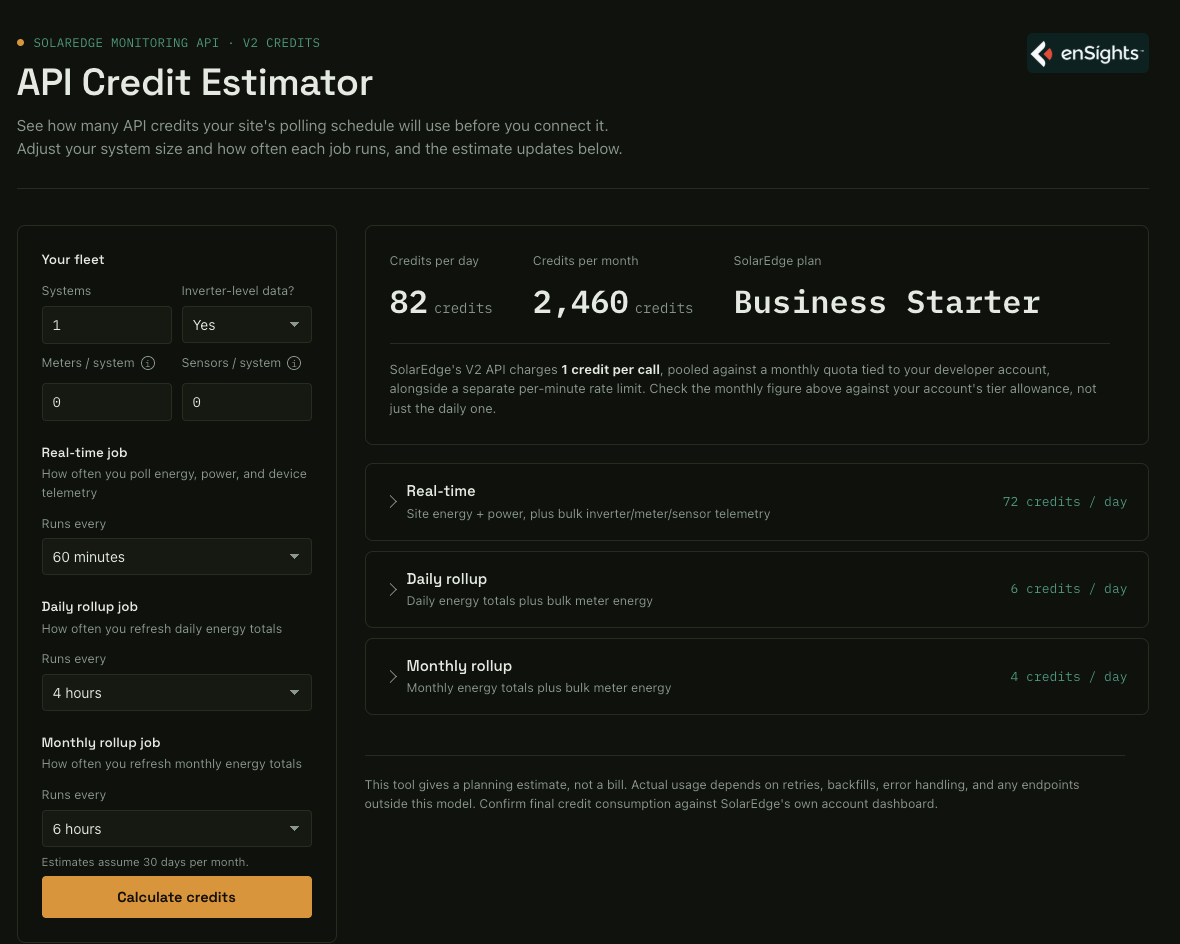
Use the SolarEdge API Credit Estimator to see how many credits your fleet will use before you buy a plan: open the calculator.
Enter your number of systems, whether you need inverter-level data, and how many meters and weather sensors each system has. Then set how often each data job runs. The calculator shows credits per day, credits per month and the SolarEdge plan that fits.
The estimate is deliberately conservative, so treat it as an upper bound. Actual usage also depends on retries, history backfills and error handling. Confirm your real usage in SolarEdge's own account dashboard after you connect.
Go to the on-line coast calcolator
Quick reference
Estimated credits per month, inverters only (no meters or sensors), with enSights' default daily and monthly refresh:
Systems | Real-time every 60 min | Real-time every 15 min |
|---|---|---|
1 | 2,460 (Business Starter) | 8,940 (Business Starter) |
5 | 12,300 (Business Starter) | 44,700 (Business Growth) |
10 | 24,600 (Business Growth) | 89,400 (Business Growth) |
25 | 61,500 (Business Growth) | 223,500 (Business Pro) |
50 | 123,000 (Business Pro) | 447,000 (Enterprise) |
100 | 246,000 (Business Pro) | 894,000 (Enterprise) |
Meters on each system add about 40% more credits, and weather sensors about 30%. Polling every 15 minutes uses about 3.6× the credits of polling every 60 minutes.
How to
Keep your data flowing past November 1st
- Create a v2 API key with My Fleet Access (steps above).
- Send the key to enSights support.
- Run the calculator and buy the SolarEdge plan that covers your monthly estimate.
Choose between 15-minute and 60-minute data
- Open the calculator and enter your fleet.
- Compare the monthly credits with Real-time job set to 15 minutes and to 60 minutes.
- If 15-minute data pushes you into a higher plan, decide whether the extra resolution is worth the cost. Tell enSights support which interval you want.
Notes
- The key is shown once. If you lose it, create a new application and send us the new key.
- Keys expire. Set a reminder a few weeks before the expiry date you chose, create a new key and send it to us, or data stops.
- Missing sites? The key only covers sites visible in your SolarEdge monitoring account. Ask your installer to give your account access, then let us know.
- Over your quota? When the monthly credits run out, SolarEdge can reject calls until the next cycle, which shows up as data gaps in enSights. Upgrade your plan or reduce the polling interval.